

LiteLogTime Clock App – Digital Time Tracking via SmartphoneLiteLog
The LiteLog time clock app replaces physical punch clocks and paper timesheets. Work hours are recorded via smartphone – using NFC, QR codes or geofencing.
Von Start-ups bis Konzernen – diese Unternehmen vertrauen LiteLog.






Lösungs-Broschüre für Ihr Einsatzfeld
Die passende LiteLog Lösung inklusive Ablauf, Nutzen und Praxisbeispielen.
Lösungs-Broschüre ladenKonkrete Abläufe für Ihre Branche
Funktionen, die den Alltag vereinfachen
Praxis-Insights aus realen Projekten
What is a time clock app?
A time clock app is the digital alternative to traditional punch clocks. Instead of time cards or paper timesheets, employees use their smartphone to record work hours. Check-in is done via NFC tag, QR code or geofencing directly at the work site. Work hours, breaks and shift times are captured and stored automatically. The time clock app is ideal for mobile teams, changing work sites or employees without a fixed desk. Unlike stationary time terminals, the app is ready to use immediately. Setup takes just minutes. Managers see all times live in the dashboard and can generate reports instantly.
- ✓Check-in via NFC, QR code or geofencing
- ✓Work hours, breaks and overtime calculated automatically
- ✓No time terminal or additional hardware needed
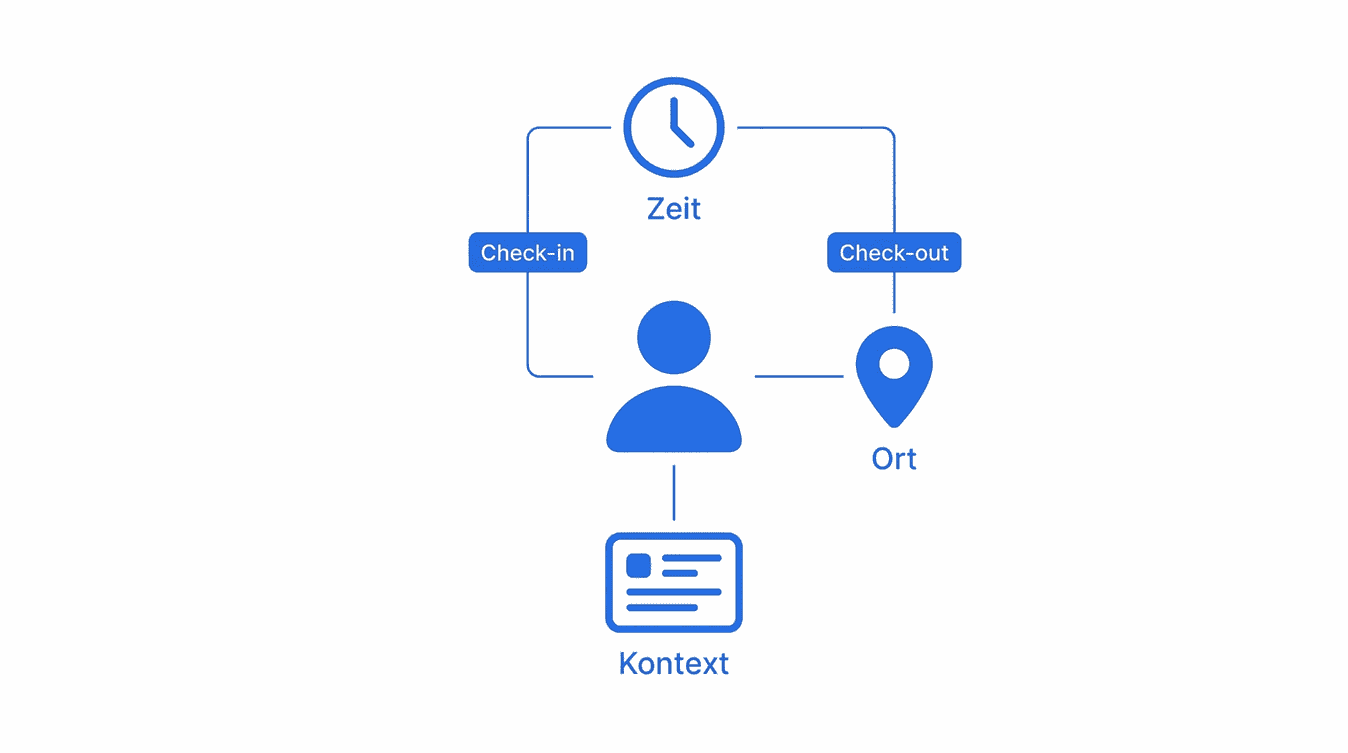
Digital time clock app vs. physical punch clock
Physical punch clocks require maintenance and are tied to one location. Paper timesheets and spreadsheets are error-prone and offer no real-time overview. A digital time clock app like LiteLog solves these problems: work hours are recorded automatically, errors are reduced and all data is available in the dashboard immediately. For distributed teams working at multiple sites, a mobile time clock app is the better choice. There are no costs for terminal hardware or time cards. And the data is stored in an audit-proof way, not on a piece of paper that can get lost.
- ✓No maintenance costs for punch clock hardware
- ✓No errors from illegible handwriting or forgotten entries
- ✓Real-time data instead of end-of-month surprises
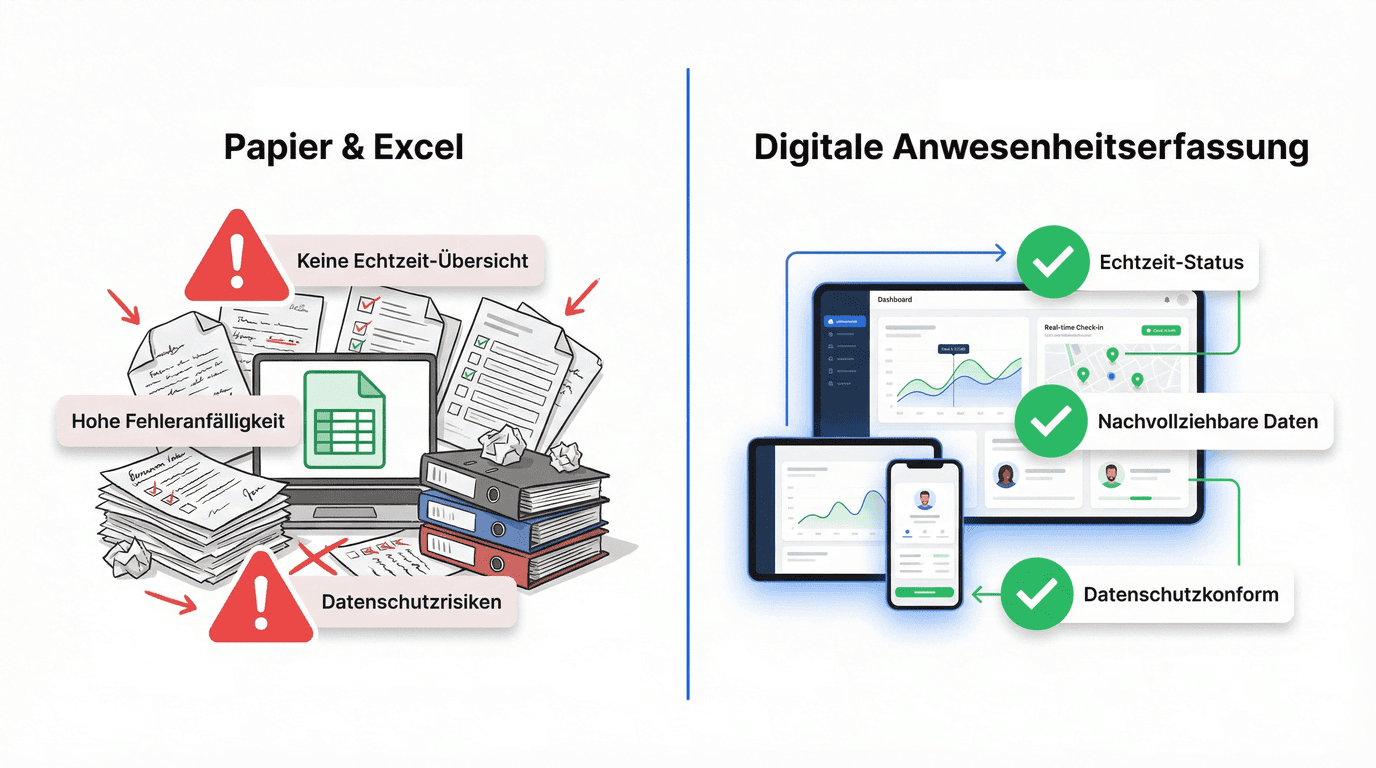
How the LiteLog time clock app works
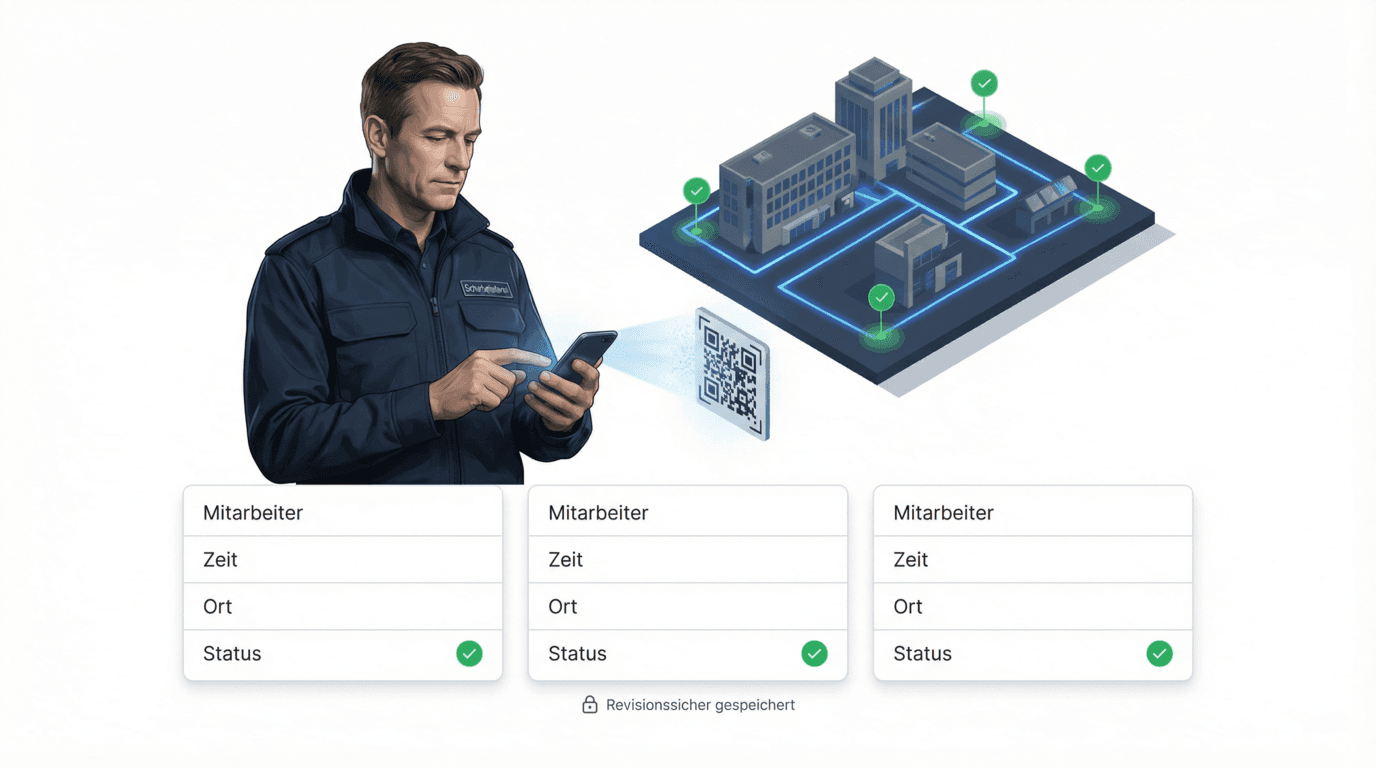
LiteLog makes time tracking via smartphone simple and fast. Employees open the app and check in at the work site via NFC tag or QR code. The time clock app records start, breaks and end automatically. Managers see in real time who is on duty at which location. At the end of a shift, a single tap on "Sign out" is enough. All times are stored in an audit-proof way and can be exported as a report immediately. The app works reliably even without an internet connection. As soon as the device is back online, all data is synchronised automatically.
- ✓Check-in at the work site via NFC or QR code
- ✓Live status in the dashboard for dispatchers
- ✓Automatic break and overtime calculation
Time clock app for security, cleaning and facility services
Security services, facility cleaning and caretaker teams work at many different locations. A stationary punch clock is not an option here. The LiteLog time clock app was built for exactly these industries. Employees record their work hours directly on site. Dispatchers see in real time who is working where. Clients receive automated proof-of-service reports on request. This reduces administrative overhead and makes work hours transparent and traceable for everyone involved.
- ✓Site-based time tracking at changing locations
- ✓Automated proof-of-service reports for clients
- ✓GPS verification of the work site
Try the time clock app for free
LiteLog offers a free 14-day trial with full functionality – no setup fees, no credit card required. The time clock app runs on Android and iPhone and can be set up in minutes. Register, create locations and invite employees. The first check-in is possible in under 10 minutes. There are no hidden costs after the trial either. Pricing is based on team size and tailored individually.
- ✓14-day free trial with full functionality
- ✓Time clock app available for Android and iPhone
- ✓No setup fees, no credit card required
Custom solutions for your requirements
Whether you need special shift models, integration with your payroll system or individual compliance requirements: we adapt LiteLog to your processes. Every organisation has its own workflows and requirements. That is why we support you personally from concept to rollout.
- ✓Tailored processes for your organisation
- ✓Integration with existing systems
- ✓Personal support from concept to rollout
Alle Time Clock App – Digital Time Tracking via Smartphone Funktionen
Time Tracking via QR Code
Many companies use simple time tracking systems. But time alone is not enough when attendance, location and reliability are decisive. LiteLog is more than time tracking—it is a location-based attendance and proof system.
Attendance Tracking App
LiteLog's attendance tracking app enables organizations to capture attendance digitally, tamper-proof, and legally compliant. Check-ins happen via smartphone, QR code, NFC or kiosk—without paper lists or Excel.
Dashboard & KPI Overview
Monitor KPIs, statuses and utilization in one central dashboard.
Customer Access, Roles & Permissions
Control exactly who can view or edit which data.
Cloud Architecture & Offline Mode
Cloud-based system with app, browser and terminal access – fully offline-capable.
Automated Reports & Exports
Create reports automatically and distribute them on a schedule.
Die harten Vorteile (messbar)
Darum wirkt LiteLog sofort

Audit-sicher ab Tag 1
Keine Nachweisdiskussion mehr – alle Signaturen sind gerichtsfest dokumentiert.
DSGVO-konform & Server in Deutschland
Ihre Daten werden DSGVO-konform in deutschen Rechenzentren verarbeitet.

Push-Warnungen
Abweichungen aktiv erkennen – statt sie zufällig zu entdecken.
FAQ
Häufige Fragen zu LiteLog
What is a time clock app?
A time clock app replaces traditional punch clocks with a smartphone application. Employees record work hours via NFC, QR code or geofencing. All data is stored digitally and available for reporting immediately.
Is the time clock app free?
LiteLog offers a free 14-day trial with full functionality. There are no setup fees. After the trial, pricing is based on team size and agreed individually.
Does the time clock app work on Android and iPhone?
Yes. The LiteLog time clock app is available for both Android and iPhone. It works on all common smartphones and can be installed and set up in minutes.
Do I need additional hardware for the time clock app?
No. The time clock app works with existing smartphones. Optionally, NFC tags or QR codes can be placed at work sites. Expensive time terminals are not required.
Is the digital time clock app GDPR-compliant?
Yes. LiteLog is GDPR-compliant and hosted in Germany. All data is encrypted in transit and stored in an audit-proof manner. Access rights can be configured per role.
Does the time clock app work without internet?
Yes. The app works offline. Check-ins and check-outs are stored locally and synchronised automatically once an internet connection is available.
Which industries is the time clock app best suited for?
The time clock app is ideal for security services, facility cleaning, caretaker services and any industry with distributed teams at changing work sites.
How quickly can the time clock app be set up?
In under 10 minutes. Register, create locations, invite employees – and the first check-in can happen. No IT department or on-site installation is needed.
Can I export work hours?
Yes. All work hours can be exported as PDF, CSV or Excel. Reports can be created manually or automatically and sent to internal or external recipients.
Does the time clock app replace a physical punch clock?
Yes. The time clock app fully replaces stationary punch clocks. Employees record work hours on their smartphone. This saves hardware costs and works at any location.
Bereit für LiteLog?
Try the time clock app for free!